> ## Documentation Index
> Fetch the complete documentation index at: https://diggercreations.mintlify.site/llms.txt
> Use this file to discover all available pages before exploring further.
# Setting Up Your Server
> Learn how to configure our setups on various hosting providers.
## Follow the Steps Below to Set Up Your Server
Download the setup zip file from the resource page of the setup you wish to install.
Unzip the file you downloaded to your computer. This will create a folder with the setup files.
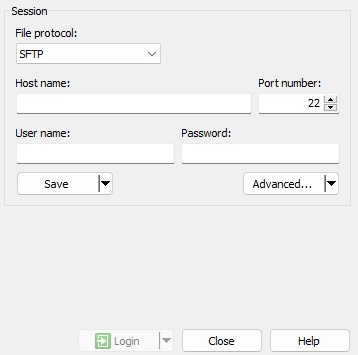 Connect to your server using an FTP/SFTP client like [FileZilla](https://filezilla-project.org/),
[WinSCP](https://winscp.net/eng/download.php) or an online file editor.
Delete all files in the root directory of your server.
Connect to your server using an FTP/SFTP client like [FileZilla](https://filezilla-project.org/),
[WinSCP](https://winscp.net/eng/download.php) or an online file editor.
Delete all files in the root directory of your server.
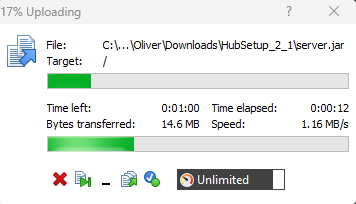 Open the folder you unzipped earlier and upload all the files to the root directory of your server.
To initiate your server, you must accept the [End User License Agreement
(EULA)](https://www.minecraft.net/en-us/eula). Open the `eula.txt` file,
change `eula=false` to `eula=true`, save the file, and restart your
server.
Download and add required plugins to your `/plugins` folder due to
licensing restrictions. You can find links to these plugins on the
individual setup pages.
Having problems? Purchase the Installation addon, and we'll set up the
server for you!
## Recommendations
For better performance, we recommend generating startup flags for your
server on [this site](https://www.birdflop.com/resources/flags/).
If you want to generate this trendy "ꜱᴍᴀʟʟ ᴄᴀᴘꜱ ꜰᴏɴᴛ" you can do it [on
this site](https://small-caps-font-generator.pages.dev/).
Open the folder you unzipped earlier and upload all the files to the root directory of your server.
To initiate your server, you must accept the [End User License Agreement
(EULA)](https://www.minecraft.net/en-us/eula). Open the `eula.txt` file,
change `eula=false` to `eula=true`, save the file, and restart your
server.
Download and add required plugins to your `/plugins` folder due to
licensing restrictions. You can find links to these plugins on the
individual setup pages.
Having problems? Purchase the Installation addon, and we'll set up the
server for you!
## Recommendations
For better performance, we recommend generating startup flags for your
server on [this site](https://www.birdflop.com/resources/flags/).
If you want to generate this trendy "ꜱᴍᴀʟʟ ᴄᴀᴘꜱ ꜰᴏɴᴛ" you can do it [on
this site](https://small-caps-font-generator.pages.dev/).